Tools
Via the Tools tile in the AI settings area, you configure which tools and integrations are available per AI provider. This determines which additional capabilities the AI can use in a conversation, such as internet searching, image generation, calculations, route planning, or information recording.
The page opens on MCP. Then follow the provider tabs from the model settings. If a provider is disabled there, the corresponding tool tab does not appear.
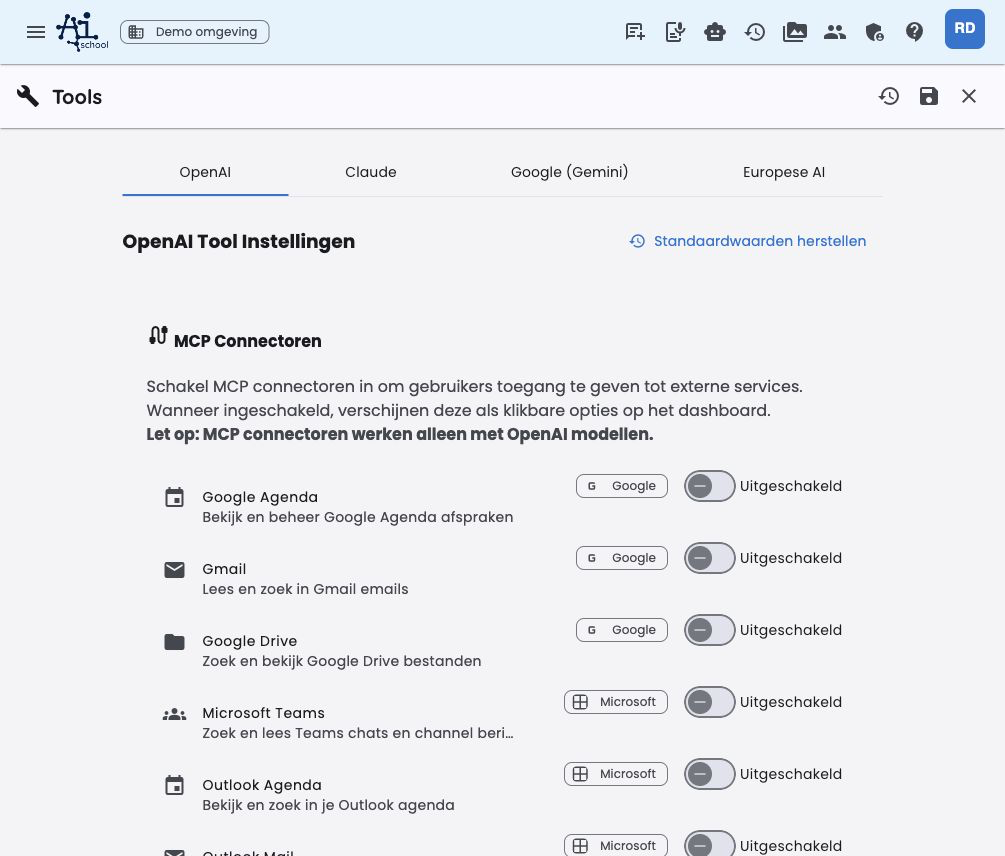
Page structure
The page is divided into tabs per provider, plus a separate MCP tab:
| Tab | Meaning |
|---|---|
| MCP | Manage suites and MCP servers for the environment |
| OpenAI | Tool settings for OpenAI models |
| Claude | Tool settings for Claude models |
| Google (Gemini) | Tool settings for Gemini models |
| European AI | Tool settings for European models such as Mistral |
Per tab you manage, depending on the provider:
- Native tools (built-in provider tools)
- Universal tools (tools from AI-School)
On the MCP tab you manage MCP servers at the environment level. These are separate from the provider-specific tool settings.
The explanation for an individual tool is in the info button next to the tool name. This keeps the page compact, while administrators can view extra context per tool.
Google and Microsoft connectors
Under MCP → Suite shortcuts you make Google Workspace and Microsoft 365 available or unavailable as a group. This manages the provider-independent AI-School integrations for the environment; an administrator does not log in here on behalf of all users.
Users enable available connectors personally via Preferences → Tools and give one-time permission there. Their tokens are stored server-side and remain usable in new chats and on other devices.
Examples of available MCP connectors:
- Google Calendar
- Gmail
- Google Drive
- Microsoft Teams
- Outlook Calendar
- Outlook Mail
The Google and Microsoft tools are executed by AI-School and are not linked to OpenAI. Users can use them with OpenAI, Claude, Gemini, and Mistral, as far as the chosen model supports tool usage.
MCP servers of the environment
On the MCP tab you can first open a store with suitable presets via Add MCP server. The web app only shows servers that can work via a public Streamable HTTP connection. Via Add an MCP server manually you open the manual form.
Use the full HTTPS endpoint, including the MCP path such as /mcp. The backend checks DNS, private addresses, redirects, and the MCP handshake. After registration, chats only use a connectorId; endpoints and secrets are not in the chat configuration.
An MCP server configured here appears on the dashboard under Tools for users who are allowed to see MCP integrations. They see these environment servers alongside their own personal MCP servers and can start a chat with them directly.
Users cannot edit or delete environment servers themselves. They can personally enable or disable an available server. Management is done centrally via Admin environment → AI settings → Tools → MCP.
Environment servers are only visible to users who have access to MCP integrations. This access is determined via the environment limits and any individual settings for staff or learners.
Native tools
Native tools are built-in tools from the provider itself. They are not executed by AI-School, but offered by the provider at the model.
| Tool | Provider | Description |
|---|---|---|
| OpenAI Web Search | OpenAI | Searches current information via OpenAI's built-in web search function |
| OpenAI Code Interpreter | OpenAI | Executes Python code for data analysis, calculations, and visualizations |
| Claude Web Search | Claude | Searches current information via Claude's built-in search function |
| Claude Web Fetch | Claude | Retrieves content from web pages and PDF documents |
| Claude Code Execution | Claude | Executes Bash and Python code in a secure sandbox |
| Gemini Google Search | Searches current information via Gemini's built-in Google Search | |
| Gemini Code Execution | Executes code for calculations and data analysis | |
| Gemini URL Context | Retrieves content from URLs for extra context | |
| Gemini Google Maps | Uses Google Maps for location information, routes, and places |
Gemini 3 and newer models can combine suitable Google-native tools with universal tools and Google or Microsoft integrations from AI-School. Older Gemini models disable universal tools in a context with active native tools to prevent incompatible tool combinations.
Code execution tools, such as OpenAI Code Interpreter, Claude Code Execution, and Gemini Code Execution, are off by default. Enable these consciously when code execution, calculations, data analysis, or file editing is needed.
Universal tools
Universal tools are available for providers where they technically fit and are offered by AI-School itself. Per provider you choose per tool what happens.
| Tool | Description |
|---|---|
| Generate image | Generates images based on a text description |
| Create practice questions | Automatically creates quiz or practice questions about a text or topic |
| Internet search | Searches current information on the internet |
| Image search | Searches images on the internet based on a search term |
| Weather query | Retrieves the current weather forecast for a location |
| AI content check | Analyzes whether a text may have been generated by AI |
| Wikipedia search | Searches Wikipedia for encyclopedic information |
| Google Routes | Plans routes and calculates travel times |
| Google Places | Searches information about locations and businesses |
| Wolfram Alpha | Performs complex calculations and scientific analyses |
| Wikiwijs lessons | Searches Wikiwijs for educational lesson materials |
| SLO learning goals | Searches the Dutch curriculum for core objectives and subject cores |
| Recording | Saves important information as an editable note with the chat |
Some internal tools, such as chat_history_search, do not appear in this overview. They are automatically available to the assistant and follow the same environment, user rights, and retention period. Administrators cannot manage them separately via the tool settings.
Setting per tool
For each tool you choose from four values:
| Setting | Meaning |
|---|---|
| Automatic | The AI decides itself whether the tool is useful for the query |
| On | The tool is always enabled in the relevant context |
| Off | The tool is disabled and cannot be used |
| Not visible | The tool completely disappears from the user interface and personal preferences |
The Automatic setting is recommended in most cases. Choose On only when a tool is almost always needed in that context.
Users can only set personal exceptions in their preferences for visible tools. They cannot override the environment setting for tools set to Not visible.
Reset and save
Via Restore defaults you reset the tool settings of a provider to AI-School's default settings. Changes are saved with the Save button in the app toolbar.
See also
- System prompts – steering AI behavior via system instructions
- Models – configuring available providers and models
- Tools and integrations (user manual) – explanation of the tools from a user perspective
